
Name-Based Case Searches
Superior Court cases start at the official Georgia Courts E-Access directory. Towns Superior appears in that listing, and the path continues into PeachCourt. You will need a free account first. Once inside, pick the Cases search, set County to Towns and Court to Superior, then type the party name exactly as it appears on the filing. Common names can pull more than one match. Check each record instead of grabbing the first one.
- Identify the likely court from the summons, order, citation, or type of dispute.
- Register or sign in at the official PeachCourt provider, then select Cases.
- Choose Towns County and Superior Court before entering the party name.
- Run the search and compare case number, caption, case type, court, and filing date.
- Open only the matching result, then choose “View Case Docket” for the event history.
The official help spells out these search controls and their limits, which is why a broad name alone rarely settles a Towns County docket search.
| Field Label | Type | Required | Notes |
|---|---|---|---|
| Search mode | Tabs or menu | Yes | Choose Cases, not Filings or Users, for a case docket. |
| County | Dropdown | Yes | Select Towns for a Towns County Superior search. |
| Court | Dropdown | Yes | Select Superior; do not assume lower courts appear. |
| Party name | Text | Alternative | Use the filed name and verify common-name results. |
| Case number | Text | Alternative | Use the court’s exact format when known. |
Towns County PeachCourt Account Access
PeachCourt pairs a public docket provider with Georgia's e-filing system for participating Superior Courts. Georgia Courts marks Towns Superior as a mandatory PeachCourt e-filing court. The label does not make the portal one search box for every court in Towns County. Nor does it mean you must file anything to view a public docket. Registration asks for your last and first name. It also wants an email plus confirmation, a password plus confirmation, a secret question and answer, reCAPTCHA, and acceptance of the terms. The official PeachCourt registration source shows that account screen.
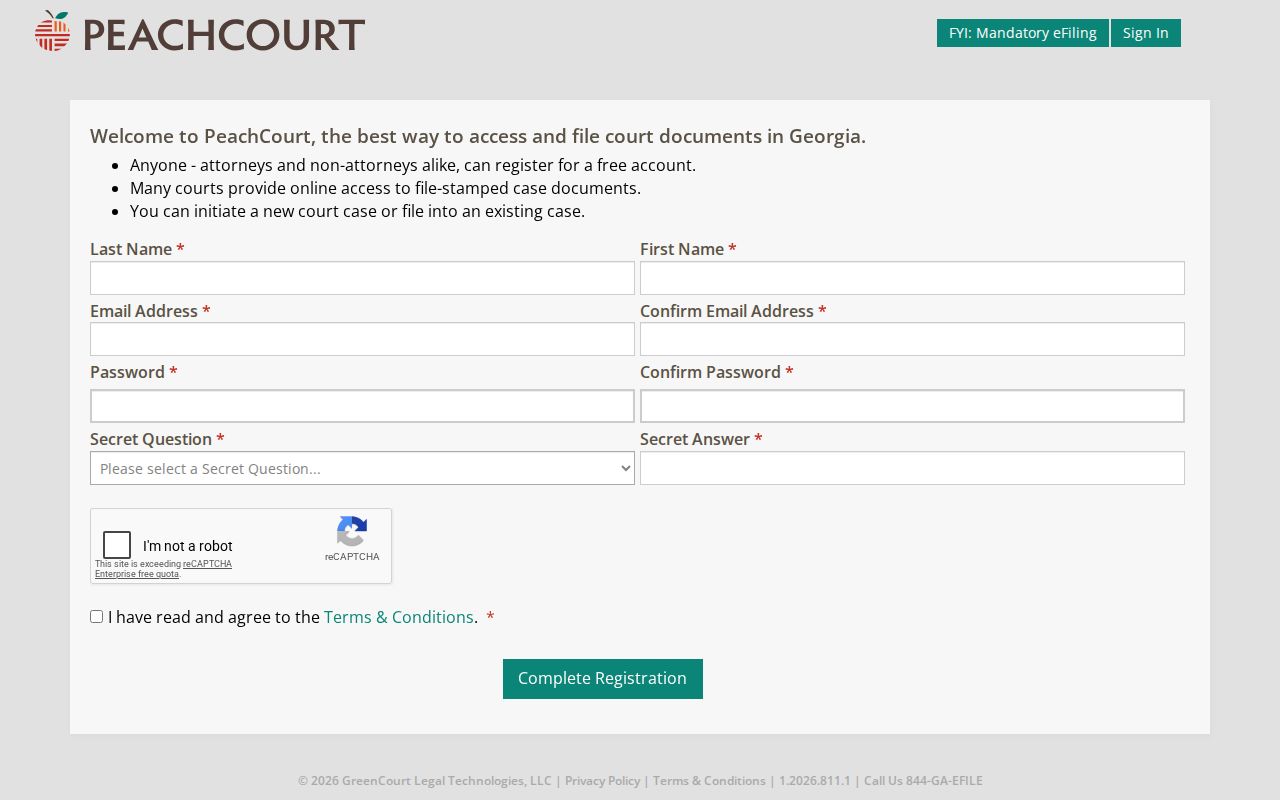
That account gate stands before any case result opens. Registration itself is free, though document images are a separate product that may carry a fee. Stick with the official provider rather than a commercial instant-record service.
Case Number Searches
An exact case number is the strongest key for a Towns County case lookup. It points to one court-assigned file. Copy it straight from a summons, citation, filed notice, or court order. Enter it in the precise format shown. PeachCourt help warns that the selected court's exact format matters. Even a changed space or punctuation mark can keep a valid case from returning. No official public Towns County case-number pattern or redacted sample exists online. So treat no made-up year, case-type code, or sequence as local. The safe example is simply [exact number from court notice]. If that value fails, compare every character. Confirm Towns County and Superior Court are selected. Then fall back to the party name. When the source notice is unclear, the clerk can verify the number.
Towns County PeachCourt Search Modes
Cases, Filings, and Users are three different tools. Someone wanting the court's chronological case record should choose Cases. Filings searches work from a Peach number. You need to know that filing identifier first. Users searches cover registered accounts. They may accept a name, email, or partial bar number. None of them replaces a party-name case search.
| Mode | Search Key | Proper Use |
|---|---|---|
| Cases | Case number or party name, with county and court | Find a Towns Superior case and open its docket. |
| Filings | Peach number | Locate a known electronic filing transaction. |
| Users | Name, email, or partial/bar number | Find a provider user, not a court case. |
Note that "File into this case" is an authorized e-filing action, not a public-record request button. Public docket review uses "View Case Docket." Keeping the two apart prevents an unintended filing workflow.
Case Search Results Explained
Check a result at two levels. First, read the header fields. Confirm the case belongs to Towns County and the expected court. Then read the event list in date order. An event might record a filing, service, hearing, continuance, order, or disposition. The entry does not always include the document itself. No status word can replace the text of a signed order.
| Case Number | The court-assigned identifier. Match it to the source notice when possible. |
|---|---|
| Court | The county and court class holding the case, such as Towns Superior. |
| Style or Parties | The formal caption and party roles shown in the public index. |
| Case Type | The broad matter, such as criminal, civil, or domestic. |
| Filed Date | The date the case began in that court, useful for separating similar names. |
| Status | A provider label such as pending or disposed, read with the latest events. |
| Docket Events | The chronological register of filings, settings, orders, and disposition activity. |
| Documents | Links or image entries when available; online images are not guaranteed complete or free. |
PeachCourt states that available images generally cost $0.50 per page plus a small convenience fee. Paying for an image still does not get you a certified copy. For an authenticated court document, contact Eric Barrett's office or use the participating GSCCCA eCertification route.
When Towns County Searches Return Nothing
A blank result can have several causes. The spelling or exact number may be wrong. The court selector may be wrong too. A recent filing might not be indexed yet. An old file might not be online at all. The matter could belong to Probate, Magistrate, Juvenile, or Hiawassee Municipal Court. It may also be sealed, restricted, or redacted under law or court order. None of that proves the case never existed.
- Retry the exact number after checking each character against the notice.
- Try the filed party name and a careful spelling variation.
- Confirm Towns County and the correct court class.
- Call the lower-court custodian if the subject does not fit Superior Court.
- Ask the clerk whether an older or unindexed docket is available at the counter.
- For a restricted record, ask what rule or order applies and whether a redacted copy is available.
Never try to work around access controls. The right next step is the court that keeps the record.
Two Ways to Search: County and State
Georgia Courts E-Access is a state directory of participating providers, not one state-run database holding every Towns County court. Its Towns Superior listing simply routes you to PeachCourt. The local clerk offices remain the county layer for files that are older, unindexed, restricted, certified, or outside PeachCourt's coverage.
| Georgia E-Access and PeachCourt | Towns County Court Offices |
|---|---|
| Online route for participating Towns Superior dockets | Superior, Juvenile, Probate, Magistrate, and municipal records by custodian |
| Search by exact case number or party name after account access | Ask by case number, court, case type, and requested record |
| Best first check for a known Superior case | Best fallback for lower-court, old, missing, or certified material |
No Towns State Court appears in the current official court lists. Do not choose a similarly named court from another county. A statewide statistical dashboard is not a case locator either; it reports aggregate counts and will not reveal an individual Towns County docket.
Lower-Court Towns County Docket Searches
Probate and Magistrate matters for Towns County run through one office. It sits at 48 River Street, Suite C, in Hiawassee. The phone is 706-896-3467. Hours are 8:30 a.m. to 4:30 p.m. on weekdays. The office offers no separate probate or magistrate search form. Docket requests therefore go through the staff directly. This counter covers estates, guardianship files, and small claims within the magistrate limit. Dispossessory matters sit here too. Warrants and preliminary matters and county traffic records assigned to the court also sit here.
Hiawassee Municipal Court handles city traffic and ordinance cases. It works from City Hall, 50 River Street, and the number is 706-896-2202. Its official page offers a ticket-payment link but no public docket-search form. Young Harris records take extra care. City minutes from September 2025 said there was no city court. Later discussion confirmed no live portal. Ask Young Harris City Hall or the issuing court. Do not assume a municipal database exists.
The court printed on a citation or notice is the better routing clue. Where an event happened matters less than where the case was filed.
Which Cases Stay Restricted
Uniform Superior Court Rule 21 begins from public access to court records, but law and court procedure can still restrict a file. Rule 21.6 governs protected identifiers and redaction. Juvenile matters carry their own confidentiality limits. Adoption and child-welfare material, sealed cases, protected identifiers, and some proposed or unexecuted orders may be absent or partly hidden online.
A Towns County docket search can return no result, a bare header, a redacted event, a restricted label, or a document list with no image attached. For a Superior or Juvenile matter, ask Eric Barrett's office which record is legally available. For Probate, Magistrate, or municipal files, ask that court directly. The Georgia Supreme Court rules hub is the official starting point for current access rules.
Access rule. Georgia’s Attorney General says courts are not subject to the Georgia Open Records Act as ordinary agencies. Request a court file through the relevant clerk’s court-record procedure.
Towns County Docket Versus Document
"View Case Docket" opens the chronological register of a case. "View Document" or an image link opens a filed item. The provider must make one available for that link to work. A Towns County court docket can therefore show that a motion, order, hearing, or disposition occurred. It does not expose the full text. Limited historical coverage and restricted categories add to the gap between the event list and the images you can open.
A browser view is not certification. When the record must be official, request a certified copy from the Superior Court clerk or through GSCCCA eCertification. That service lists Towns Superior as a participating court. Ask for the current fee and delivery steps. No fixed Towns certified-copy charge or turnaround is published. For a plain older document, call the clerk at 706-896-2130 or visit the counter after confirming its current location.